For companies
Healthier employees.
Stronger businesses.
A workforce intelligence layer over a training product your people actually use. You see where health is drifting across the organization. You never see an individual.
- Group averages only, above 20 people
- Your own single sign-on
- Export or delete, from inside the app
- Every automated decision logged
The dashboard
Where your workforce actually stands.
One screen for the health of the organization: the scores, where they are heading, which issues are most common, and what it is costing.
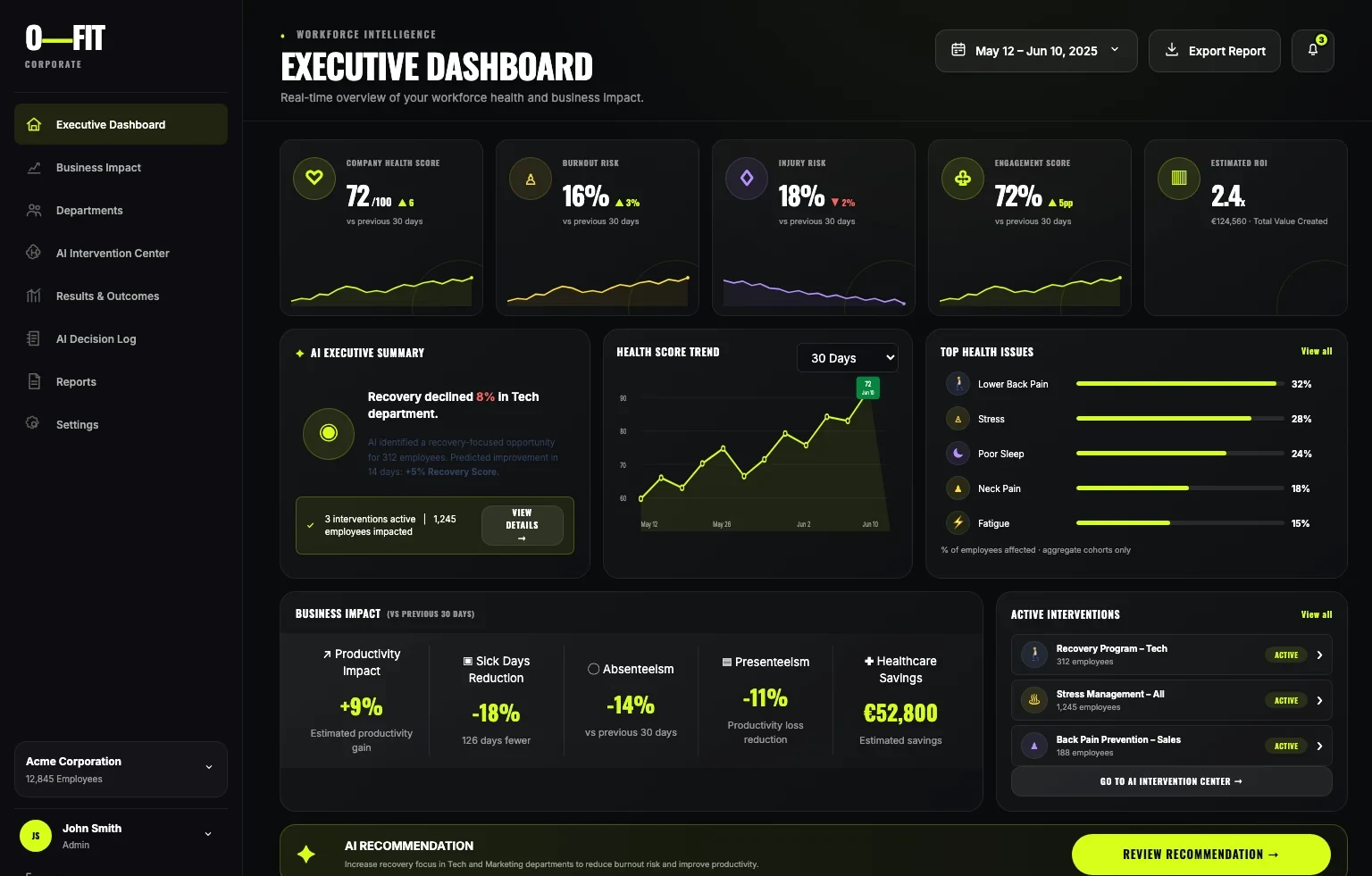
O-FIT Corporate — Executive Dashboard
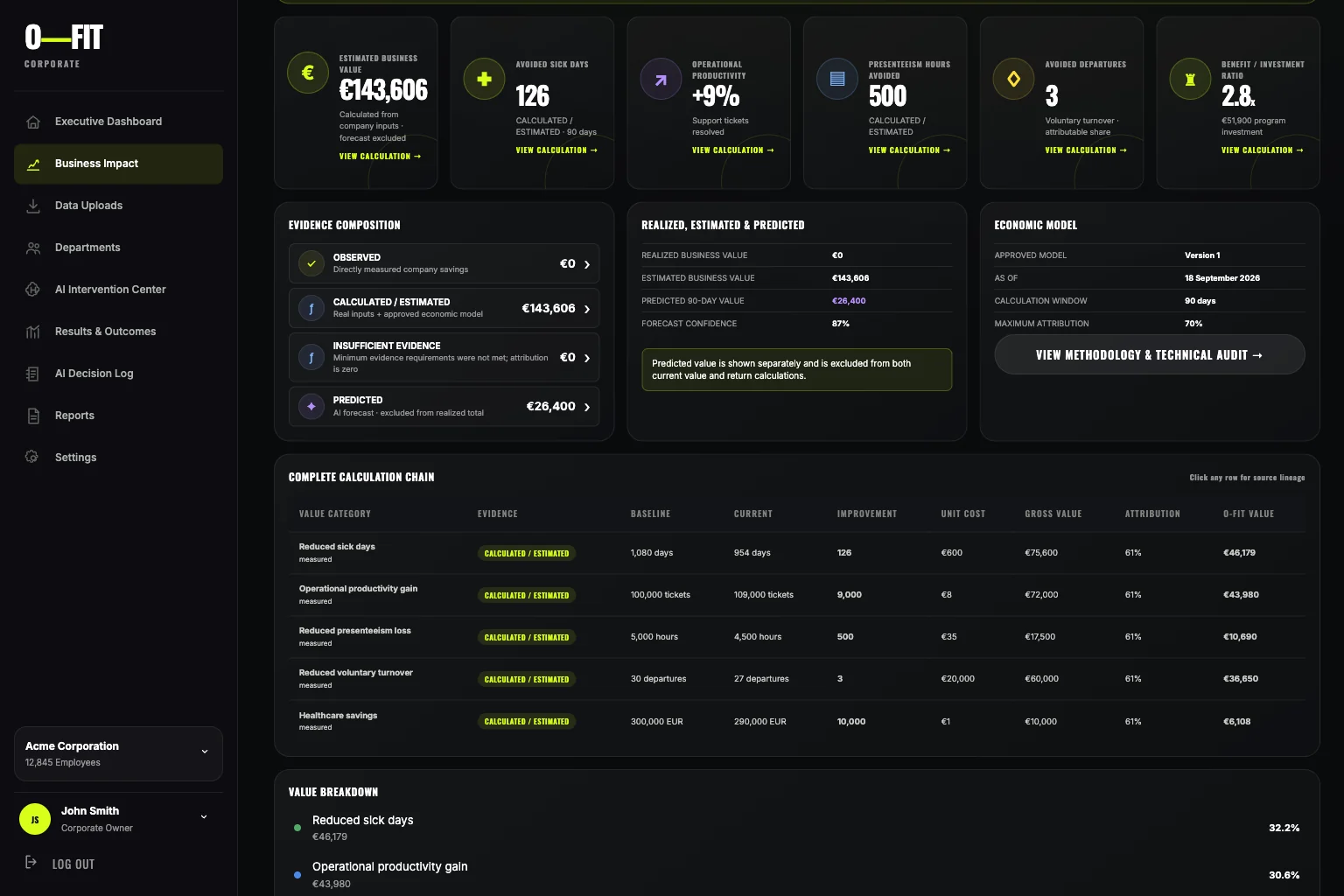
O-FIT Corporate — Business Impact, with the evidence behind every figure
-
- A company health score out of 100, with burnout risk, injury risk and engagement beside it
- Each one measured against the previous 30 days, with its trend underneath
- The most reported issues ranked — lower back pain, stress, poor sleep, neck pain, fatigue
- Every figure is a share of employees affected, in aggregate cohorts only
-
- Avoided sick days, productivity, presenteeism hours, avoided departures and healthcare cost
- Each one split four ways: observed, calculated, insufficient evidence, and predicted
- The forecast is shown on its own and left out of the current value
- A full calculation chain — baseline, current, improvement, unit cost, gross value, attribution
- Attribution is capped, so no more of a result is claimed than the model allows
-
- Recommendations aimed at a department or a cohort, not at a named person
- Each one carries its expected impact and how many people it would reach
- A person approves it before anything reaches an employee
- Once running, it is tracked against what it was expected to do
-
- Reports you can export for a period you choose
- Results and outcomes measured against what was predicted, not just what happened
- Every automated decision logged: which model version, when, and who approved it
- The log is tamper-evident — each record linked to the one before it
Fits your stack
It connects to what you already run.
Nobody wants another island. O-FIT joins your identity, your HR system and your warehouse, and it can be audited like anything else you buy.
-
- Employees sign in with the account they already have
- Access follows your directory, so a leaver loses it when your systems say so
- It sits in Settings beside your other connections, with its status visible
-
- Connections for your HR system, calendar, email and data warehouse
- Company data comes in as a CSV or spreadsheet, mapped column by column and validated
- The raw file is encrypted while you map it, and deleted after processing
- Employee identifiers never come back to the dashboard
-
- Two-factor authentication on administrator accounts
- Session management and a login history you can review
- A data retention policy you set rather than accept
- Data sources, data quality and system status all visible in Settings
-
- Departments, administrators and viewers, as separate roles
- A department head sees their own people in aggregate and nothing else
- Every role change is an entry in the audit log
Built to be trusted
Why your people will actually use it.
A wellbeing programme fails the moment employees suspect it is surveillance. So the limits are built into the product, not promised in a policy.
What they see
- How many people take part, as a number, never who
- Group averages only, and only above 20 people
- Delayed, so a single day cannot be traced back to anyone
What they never see
- Check-ins, readiness scores and pain areas
- Workouts, history and coach messages
- Anything from Apple Health
Anyone can withdraw at any time, and withdrawing never affects their access or their plan.
Rolling it out
Three ways to let people in.
Pick whichever suits your organization. None of them needs an employee to buy anything or to keep a separate work account.
-
01
An invitation link
Send it in your usual internal channel. It opens the app straight into your plan.
-
02
A company code
One short code for the whole organization, entered once. Useful where email lists are awkward.
-
03
Your own single sign-on
Nothing new to remember, and access follows your directory when somebody joins or leaves.
Next step
See it with your own numbers.
We will walk you through the workforce dashboard and what it would report for an organization your size.
This form is not connected yet. Submissions have nowhere to go until it is decided who receives them and where they are stored.